Yes to both. Designer has an ontology importer from 10.1.5 on, and 10.1.6 reads all four common RDF formats: RDF/JSON (.rj), N-Triples (.nt), Turtle (.ttl) and JSON-LD (.jsonld). On a 10.1.5 build, stick to .rj or .nt.
What the importer does with the file
- each
owl:Class becomes a UserType
- each
owl:NamedIndividual becomes a Tag at <path>/<entity>/Attr, typed by its class. The asset tree folders are created from the path
- object and datatype properties become members of the UserType
rdfs:label goes to DisplayText, rdfs:comment to Description, rdfs:subClassOf to BaseUserType, and the full IRI to SourceIri- anything else (dcterms, skos notes, custom predicates) is kept in the Attributes column
Try it with a small public ontology
The LocalAI KnowledgeGraph Demo page has a small ISA-88 ontology (8 classes) you can download: LocalAI KnowledgeGraph Demo Source.rj, plus a matching policy file.
- Open a solution in Designer, new or existing.
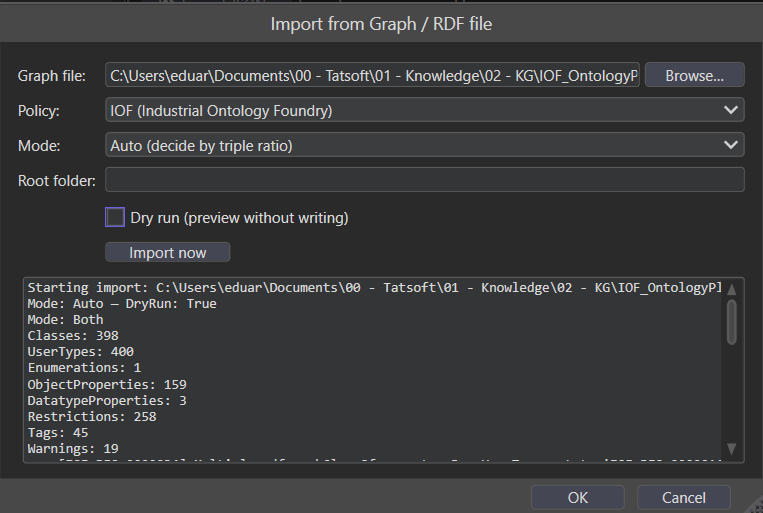
- Go to Solution → Import Tags → Graph / RDF file and pick the .rj file.
- Pick a policy (
isa88, iof, your own JSON, or leave it blank for a generic OWL file) and leave the mode on Auto.
- Keep Dry Run checked and click Preview. The log tells you what would be created and warns about things like inheritance cycles.
- Uncheck Dry Run and click Import now.
[SCREENSHOT]
The /Attr tags hold the static facts from the ontology. For live values (temperature, status and so on), add a sibling tag at <path>/<entity>, without /Attr, and connect it to your devices as usual.
If you work with the AI Designer, the same engine is the import_graph_model tool. Run it once with dry_run=true before the real import.
Exporting back to RDF
Solution → Export → Export UNS, then choose RDF/JSON, JSON-LD, Turtle or N-Triples in the Format list. The file lands in the solution’s Exchange folder, under <SolutionName>_UNS_<format>. From 10.1.6 the export includes the tag instances and the asset tree, not only the types. There is no direct push to a SPARQL endpoint yet, so upload the file to your triple store yourself.
One limit to know: OWL restriction styles (someValuesFrom, cardinality), unionOf/intersectionOf classes and loose blank nodes are flattened on import. If you need full OWL axiom fidelity, keep the ontology file as the master and use FrameworX for the operational side.
Full walkthrough: Industrial Ontology Integration How-to